Display Navigation
Navigation
The ins and outs of your Seakeeper display will help you better understand what your Seakeeper is doing and how it’s performing while it’s keeping your boat steady!

Home
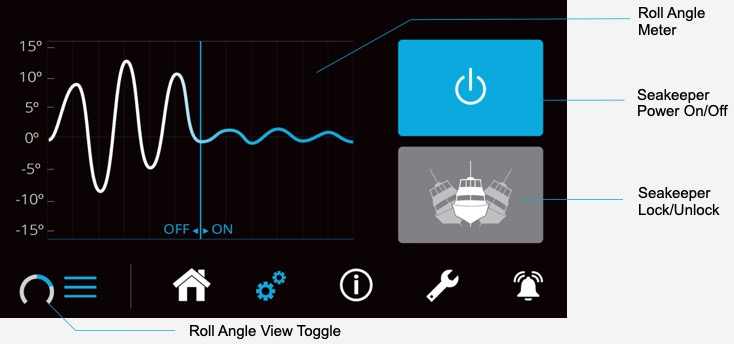
Roll Angle View: Graph
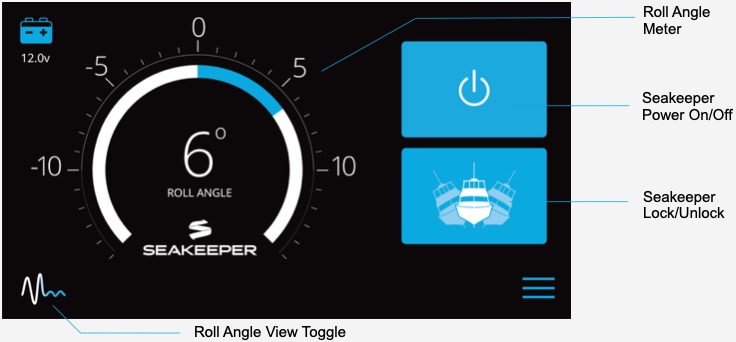
Roll Angle View: Meter
Roll Angle Graph
The Roll Angle Graph shows the Seakeeper’s performance over time, differentiating performance with the unit on and off. The y-axis shows the roll angle in degrees as the boat roll’s from port to starboard and back. A white line shows performance with the Seakeeper off, and a blue line shows performance with the Seakeeper on.
Roll Angle View Toggle
To show the real-time roll boat roll, use the icon in the lower left corner of the screen to toggle between the Roll Angle Graph and the Roll Angle Meter.
Seakeeper On/Off
When the Power button is gray, the Seakeeper unit is powered off. Press the button to turn on the Seakeeper. The button will become blue when the Seakeeper is powered on. We suggest turning your Seakeeper on as soon as you get on board, so the flywheel has time to spool up before you leave the dock.
Seakeeper Lock/Unlock
Hydraulic brake arms control the Seakeeper’s precession (fore and aft tilting), which is how the unit releases its stabilizing force. You can “lock” and “unlock” the brake arms to toggle between stabilizing and not stabilizing the boat. (You may have seen us do this at a boat show on a “dock rock” demo.) This allows you to stop the Seakeeper from stabilizing, whether to preserve warranty hours or just because it’s fun to show off to your friends!
Settings
Language
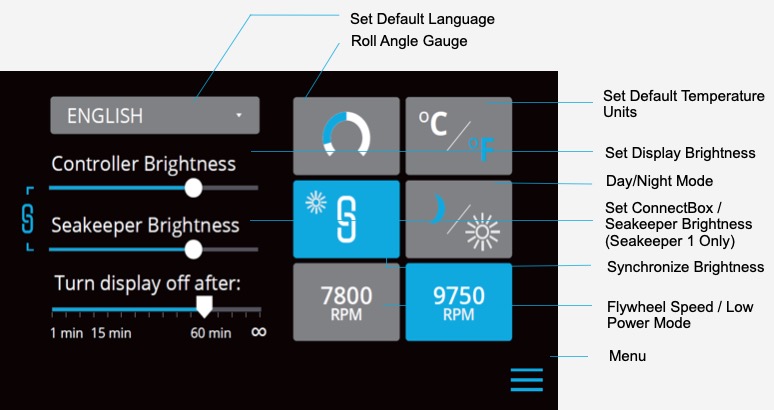
Set your default language for use throughout the display. Choose between English, French, German, Spanish, Italian, Portuguese, Chinese and Japanese.
Roll Angle Gauge
If the Seakeeper is facing the bow of the vessel, the Roll Angle Gauge should show the blue on the left (pictured left). If the Seakeeper is facing the stern of the vessel, you should select the Roll Angle Gauge with the blue on the right (pictured right). A positive roll angle should be displayed when the vessel rolls to starboard.
Temperature Units
Choose between Fahrenheit and Celsius; the selected option appears in blue.
Day/Night Mode
Day/Night Mode changes the colors on the screen making it easier to read in either sunlight or darkness; the selected mode appears in blue.
Controller Brightness
This slider allows you to adjust the brightness of your Seakeeper Display screen.
Seakeeper Brightness
This slider allows you to adjust the brightness of your actual Seakepeer 1 unit and ConnectBox. Note that this is only visible on Displays sold with a Seakeeper 1.
Synchronize Brightness
Connect your Display and Seakeeper so they’re always illuminated at the same level or tap (turn off/gray button) to control each separately. Note that this is only visible on Displays sold with a Seakeeper 1.
Turn Display Off After
After this set amount of time, your Seakeeper display will go black/dormant. Just tap the screen to turn the display back on.
Flywheel Speed
When anticipating long use with limited power, you can reduce the speed of the flywheel so the Seakeeper draws less power. Of course, this also means your performance will be reduced and thus your boat will be less stable. The RPMs on the screen above are an example only, and the numbers on your screen may differ based on which Seakeeper unit you have. When power is cycled (or Seakeeper turned Off), this speed will default back to the normal operating speed.
Information
Model
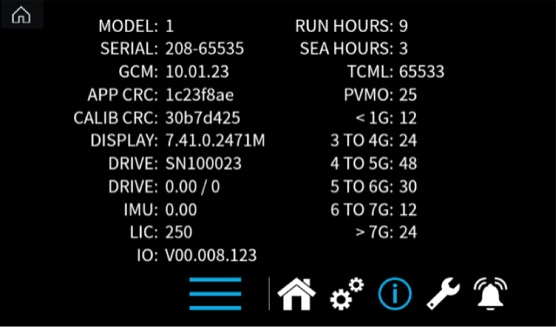
Your Seakeeper model, for example, Seakeeper 1, Seakeeper 2, Seakeeper 3, etc.
Serial
Your Seakeeper Serial Number identifies your unit from all the others. This will be important for service or warranty work.
Run Hours
Run Hours indicates the total number of hours the unit has been powered on.
Sea Hours
Sea Hours indicates the total number of hours the unit has been powered on and unlocked, or stabilizing. Only Sea Hours are used to determine warranty eligibility.
Other Information
The other numbers and identifiers on this page are for your Dealer’s use. This helps them understand more about your Seakeeper unit, what software it’s running, etc.
Service
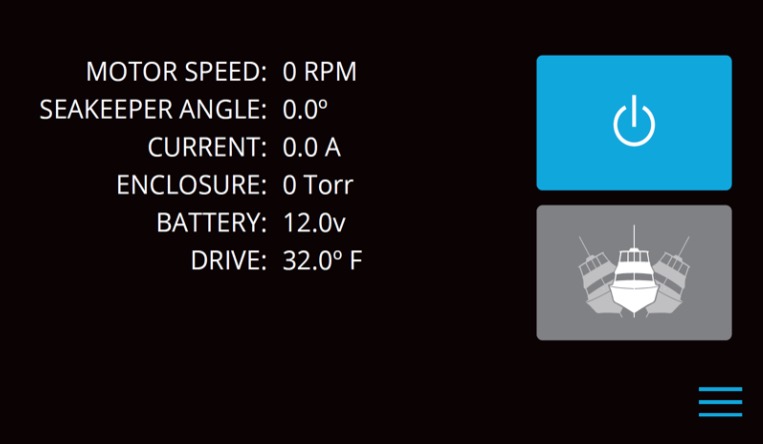
Motor Speed
The motor speed indicates how fast the Seakeeper flywheel is spinning. For example, the Seakeeper 1, spooled up entirely, should show 9,750 RPM.
Seakeeper Angle
This shows the angle at which your Seakeeper is positioned at any given time, rather than the boat’s roll angle, shows on the home screen.
Current
Power draw from the Seakeeper unit is listed here. You’ll notice your Seakeeper draws more power while it’s spooling up, and it’ll drop significantly once the power is only being used to maintain the flywheel’s speed.
Enclosure
The Seakeeper’s flywheel is housed in a vacuum-sealed sphere. That vacuum is measured in “Torr.” This will help alert your Dealer to vacuum loss, if any.
Battery
Indicates necessary battery power to operate your Seakeeper unit.
Drive
The temperature of the drive box is monitored so it will alert you, and if high enough, shut the unit off, to prevent damage to the unit because of high temperature.
Alarm History

Alarms, if/when they occur, will pop up on whatever screen you’re currently viewing. Once you exit out of an alarm, you can review that alarm on the Alarm History page. It also records at what Run Hours the alarm became present. This information is important in helping your Seakeeper Dealer work towards a solution to resolve the issue.